

Latest Version
Educatesoft
Sports
Windows
Free
9wzdncrdwzlw
Report a Problem
More About Score Clock
Transform Your Windows Device with a Score Clock Sports Scoreboard
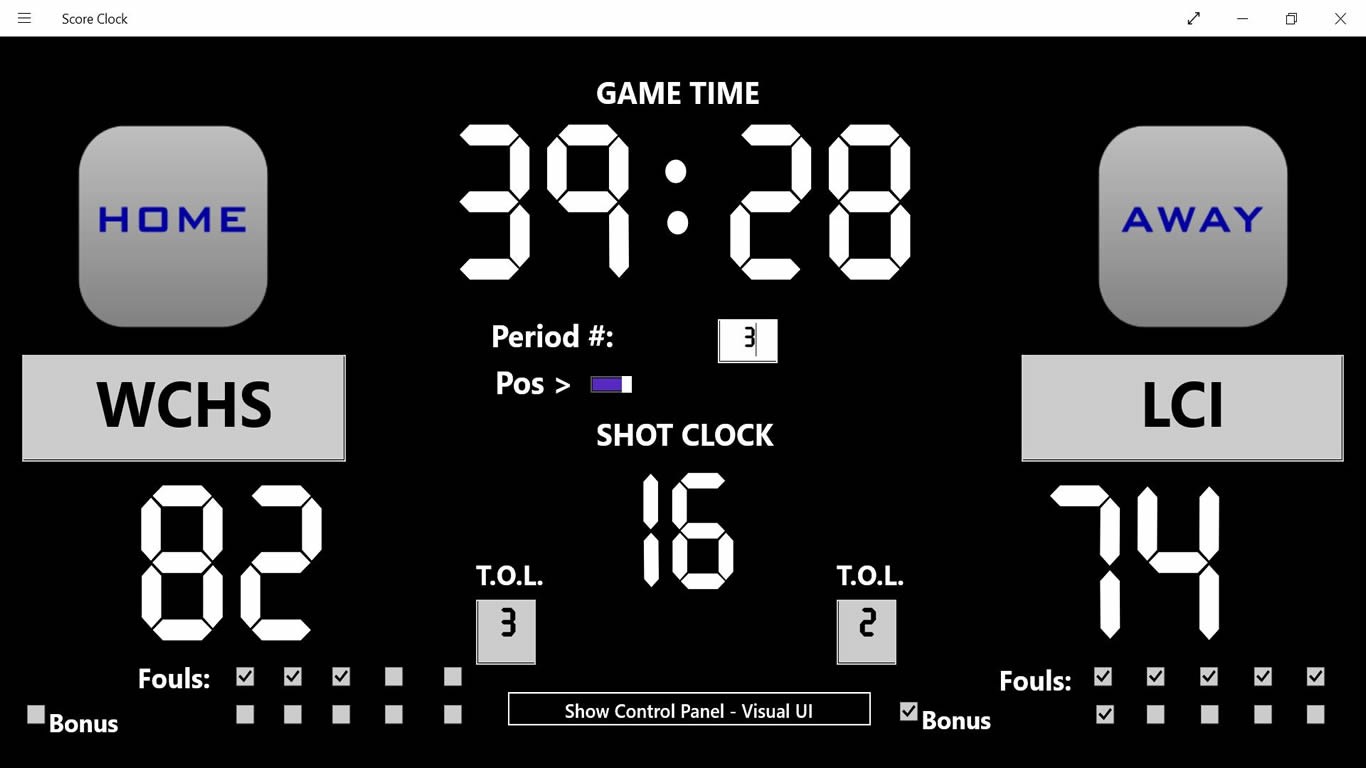
Managing game times and keeping track of points during a match can be a logistical headache without the right equipment. The Score Clock sports scoreboard by Educatesoft offers a straightforward, digital solution to this common problem. Designed specifically for the Windows platform, this lightweight utility turns your laptop, tablet, or desktop PC into a highly visible, functional scoreboard in seconds.
Whether you are organizing a local community tournament, running practice drills, or managing a school game, this app eliminates the need for expensive physical scoreboards or complex timing software. Its main appeal lies in its simplicity, focusing entirely on delivering clear, reliable timekeeping and score tracking without unnecessary clutter.
Practical Applications: What Can You Do with It?
The beauty of this utility is its adaptability across different sporting environments. Here is how you can put the Score Clock sports scoreboard to work in real-world scenarios:
- Multi-Sport Flexibility: The interface is designed to support a wide variety of athletic disciplines. It works exceptionally well for major sports such as soccer, football, rugby, and basketball.
- Adaptable Game Periods: You can quickly adjust and keep track of specific period lengths, making it easy to transition from halves in soccer to quarters in basketball.
- Instant Portable Display: By running the application on a portable Windows tablet or a laptop connected to a larger projector or external monitor, you can set up a highly visible scoring station anywhere.
Key Features and User Experience
The developer, Educatesoft, has focused on a minimalist design philosophy. Instead of overwhelming users with deep menus, the interface provides immediate access to the essential tools required during active gameplay. The primary features include:
- Intuitive Scoring Controls: Quickly add or subtract points for both home and away teams with minimal clicks.
- Reliable Period Timers: Start, pause, and reset the countdown clock to manage periods precisely.
- High-Contrast Layout: The visual elements are structured to be easily readable from a distance, which is crucial when players and spectators need to check the remaining time at a glance.
Who Is This App For?
The Score Clock sports scoreboard is an ideal match for physical education teachers, amateur league organizers, and youth sports coaches who need a dependable timing tool on a budget. Because it is optimized for Windows devices, it is particularly useful for anyone who already travels with a laptop or tablet to games and practices.
Get Started with Score Clock
If you are looking for a no-nonsense, functional way to manage game times and match points directly from your PC, this utility is well worth considering. To see the tool in action, check out the official Microsoft Store page to learn more about the application and add it to your Windows toolkit.
Rate the App
User Reviews


Popular Apps









Editor's Choice